European government agencies are increasingly seeking Microsoft Teams alternatives and secure messaging platforms due to data sovereignty concerns, GDPR compliance challenges, and the need for greater control over sensitive communications. This comprehensive guide compares leading government chat alternatives—including Rocket.Chat, Slack, Mattermost, and Element—across critical dimensions: sovereignty, security architecture, compliance capabilities, deployment flexibility, and total cost of ownership.
Key finding: open-source, self-hosted communication solutions offer European governments the sovereignty and security control that cloud-dependent collaboration tools cannot match. Whether you're facing regulatory pressure, security requirements, or simply evaluating Teams replacement options, this comparison provides the decision framework you need to choose the right secure messaging platform for your agency.
Why European governments are evaluating communication alternatives alongside Microsoft 365
Many European government agencies continue to rely on Microsoft Office 365 for productivity tools, and for good reason—the suite offers robust document management, email, and collaboration features. However, when it comes to real-time communication and messaging, some agencies are exploring complementary platforms that can integrate with their existing Microsoft infrastructure while offering additional sovereignty and security options.
The shift toward evaluating Microsoft Teams alternatives among European government agencies isn't happening in isolation. It's the result of mounting regulatory pressure, high-profile data transfer violations, and a broader awakening to the risks of digital dependency on US-based collaboration platforms for sensitive communications.
The reality is nuanced: most government bodies haven't yet migrated away from Microsoft Office or Teams. Adoption of secure communication alternatives varies significantly across Europe—some countries like Germany and the Netherlands are actively evaluating complementary messaging platforms, while others remain in early exploration phases. However, the general sentiment across European public sector organizations is clearly moving toward understanding options that can work alongside their existing Microsoft 365 deployments.
Microsoft has responded to these concerns with the introduction of its EU Data Boundary and Microsoft Cloud for Sovereignty initiative, which promises to store and process EU customer data within Europe and provide greater transparency. While this represents progress, sovereignty advocates argue it doesn't fully resolve the fundamental issue: Microsoft remains a US company subject to US jurisdiction and the CLOUD Act, meaning the company could still be compelled to provide access to data regardless of where it's physically stored.
Multiple European countries including Germany, Denmark, France, Italy, Austria, and the Netherlands are actively migrating government systems away from Microsoft Teams and Office, affecting hundreds of thousands of workstations.
In 2023, the Dutch government initiated a large-scale migration away from Microsoft products after the country's Data Protection Authority raised serious concerns about data transfers to the United States. The German Federal Commissioner for Data Protection and Freedom of Information issued similar warnings, noting that Microsoft's data handling practices made it nearly impossible for public sector organizations to use Teams in compliance with GDPR.
According to research from the European Data Protection Board, many of EU member states have reported concerns about US cloud services and government access to data. The 2020 Schrems II ruling invalidated the EU-US Privacy Shield framework, creating legal uncertainty that remains unresolved despite subsequent agreements.
But regulatory concerns tell only part of the story. European governments evaluating alternatives to Teams often cite three considerations:
- Data sovereignty requirements. When government communications flow through Microsoft's infrastructure, agencies must rely on vendor assurances regarding data location and access controls. The US CLOUD Act enables American law enforcement to access data stored by US companies regardless of where it's physically located. For agencies with strict sovereignty mandates, self-hosted alternatives provide direct control that cloud services cannot match.
- Integration flexibility. While Teams integrates deeply with the Microsoft 365 ecosystem, some agencies need communication tools that can also connect with non-Microsoft systems, legacy infrastructure, and specialized government applications. Open-source platforms often provide more flexible API and integration options.
- Auditability for sensitive communications. While Teams offers enterprise security features, its closed-source architecture limits independent security verification. Government agencies handling classified information often require the ability to audit code, customize security controls, and deploy on air-gapped networks. For defense communication systems and sensitive government operations, open-source platforms enable verification that proprietary solutions cannot provide.

The European Commission's own digital sovereignty strategy emphasizes that "Europe must reduce its dependency on non-European technologies" and develop sovereign alternatives. This isn't anti-American sentiment—it's a pragmatic recognition that digital infrastructure is national infrastructure, and nations must control their critical systems.
Core requirements for government communication platforms
Not all communication platforms are created equal, and government requirements differ fundamentally from commercial deployments. Before comparing specific alternatives, agencies must understand the non-negotiable criteria that separate suitable platforms from inadequate ones.
Data sovereignty and residency
Data sovereignty means more than just storing data in EU data centers. It requires that data remains under the legal jurisdiction of EU law, not subject to extraterritorial access by foreign governments. A platform with EU data centers but US ownership and control fails this test.
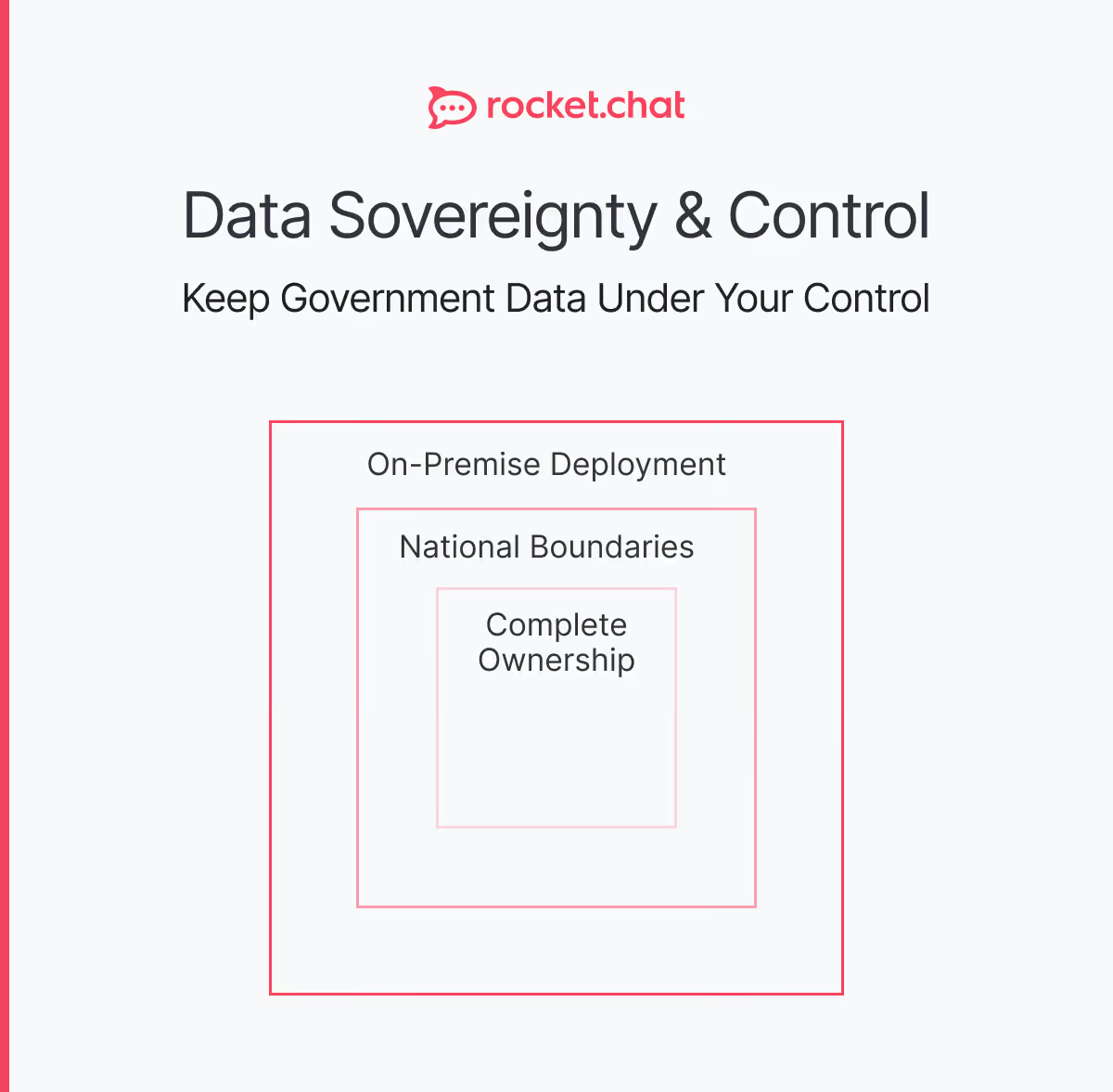
True sovereign platforms offer:
- Complete data residency within EU borders
- Legal entities governed by EU law
- No forced data transfers to third countries
- Protection from foreign surveillance laws
- Full data portability and export capabilities
For government communication requirements, agencies should verify not just where data is stored, but who controls it, who can access it, and under what legal framework.
End-to-end encryption
While many platforms claim "encryption," few implement true end-to-end encryption (E2EE) where only the sender and recipient can decrypt messages. Platform providers should have zero access to message content, even if compelled by legal demands.
Government-grade encryption requires:
- Client-side encryption with no server-side keys
- Perfect forward secrecy (PFS)
- Independent cryptographic audits
- Transparent encryption implementation
- Option for air-gapped deployments
The difference matters enormously. Encryption in transit (HTTPS) protects data while moving between client and server, but the platform provider can still read messages. For sensitive government messaging, only E2EE provides adequate protection.
Compatibility with Microsoft 365 ecosystem
Most government agencies aren't looking to abandon Microsoft Office entirely. The ideal Teams alternative should integrate seamlessly with Microsoft 365, allowing agencies to maintain their productivity suite while gaining additional control over sensitive communications.
Key integration requirements include:
- Active Directory/Azure AD authentication: Single sign-on across platforms
- File storage integration: Connect with OneDrive, SharePoint, or alternative storage
- Calendar synchronization: Integration with Outlook calendars for meeting scheduling
- User provisioning: Automatic account creation based on AD groups
- Email notifications: Leverage existing Exchange infrastructure
Platforms like Rocket.Chat, Mattermost, and Element are designed to complement Microsoft 365 deployments, not replace them. This allows agencies to use Microsoft's productivity tools where they excel (documents, spreadsheets, presentations) while employing sovereign platforms for real-time communication and sensitive discussions.
Compliance frameworks
European government agencies must navigate an increasingly complex regulatory landscape. Platforms must support compliance with multiple overlapping frameworks:
- GDPR: Data protection, privacy by design, data subject rights
- NIS2 Directive: Cybersecurity requirements for critical infrastructure
- eIDAS 2.0: Digital identity and trust services
- National security classifications: Support for CONFIDENTIEL, SECRET, and higher classifications
Beyond checkbox compliance, platforms need built-in compliance features: audit logging, data retention controls, legal hold capabilities, and detailed compliance reporting.
Air-gapped deployment options
Some government communications are too sensitive for internet-connected systems. Intelligence services, military operations, and classified research require air-gapped collaboration platforms that operate on isolated networks with no external connectivity.
Suitable platforms must support:
- Complete offline operation
- On-premises deployment without cloud dependencies
- Manual update mechanisms
- Local user authentication
- Isolated data storage
This capability is non-negotiable for defense and intelligence applications, yet most commercial platforms—including Teams—cannot operate without internet connectivity.
Open source auditability
Closed-source platforms ask governments to trust but never verify. Open-source software allows independent security audits, enabling government security teams to review code, identify vulnerabilities, and verify that no backdoors exist.
The French government's digital sovereignty strategy explicitly requires that critical government software be open source and auditable. Germany's Federal Office for Information Security (BSI) recommends open-source platforms for government communications specifically because they enable security verification that proprietary platforms cannot provide.
Open source also protects against vendor abandonment. If a commercial vendor discontinues a product, closed-source software becomes unsupportable. Open-source platforms ensure long-term viability regardless of any single vendor's decisions.
Microsoft Teams alternatives comparison: detailed platform matrix
The following comparison evaluates five leading platforms across the criteria most critical to European government agencies. Ratings reflect capabilities as of early 2026.
Key observations
Sovereignty leaders: Rocket.Chat, Mattermost, and Element offer true data sovereignty through self-hosted deployment and open-source transparency. Teams and Slack remain fundamentally dependent on US infrastructure and legal jurisdiction.
Security architecture: Only Rocket.Chat and Element provide native end-to-end encryption without requiring plugins or workarounds. This matters enormously for secure team chat in government contexts.
Deployment flexibility: Air-gapped deployment capability separates platforms suitable for classified government work from those limited to standard enterprise use. Teams' cloud dependency makes it unsuitable for sensitive deployments.
Compliance posture: While all platforms claim GDPR compliance, only self-hosted open-source solutions provide the control required to definitively meet EU data protection requirements without relying on vendor assurances.
Teams replacement options: in-depth feature comparison
Rocket.Chat: comprehensive sovereignty and security
Rocket.Chat offers the strongest sovereignty position for European governments. As an open-source platform with self-hosted deployment, agencies maintain complete control—data never leaves government infrastructure, with no cloud dependencies or foreign jurisdiction access. The platform supports private clouds, on-premises data centers, and air-gapped networks for classified communications.
For security, Rocket.Chat implements native end-to-end encryption using established cryptographic libraries. Messages are encrypted client-side, with only recipients holding decryption keys. The platform supports both E2EE for sensitive channels and standard encryption for operational communications requiring searchability and compliance logging.
Rocket.Chat provides comprehensive audit logging capturing all system events, user actions, and administrative changes—logs that feed into government SIEM systems. Retention policies support automatic deletion, archival to cold storage, and legal hold overrides. The platform excels in deployment flexibility, supporting cloud hosting in sovereign European providers, full on-premises deployment, hybrid architectures, and complete air-gapped operation for classified work.
Cost-wise, Rocket.Chat offers transparent per-user licensing for enterprise features, with unlimited users for self-hosted community deployments—often significantly less expensive than proprietary alternatives over five years.
.avif)
Mattermost: developer-focused sovereignty
Mattermost provides strong sovereignty through self-hosted deployment and open-source architecture, enabling full government control over data, infrastructure, and access. Like Rocket.Chat, it supports completely isolated deployments with no internet connectivity, vendor telemetry, or cloud dependencies—essential for military and intelligence applications.
The platform offers comprehensive audit logging and can be deployed in sovereign European cloud providers or on-premises with no cloud dependencies. Mattermost's open-source code allows independent security verification and penetration testing. Its transparent per-user licensing model avoids vendor lock-in and licensing escalation common with proprietary platforms.
Element: federation-first architecture
Element, built on the Matrix protocol, pioneered E2EE for federated communications and remains the gold standard for cryptographic messaging. However, its complexity can create operational challenges for large government deployments.
Element offers strong sovereignty through self-hosted deployment and open-source architecture. It supports air-gapped deployment for classified work and can be hosted in sovereign European cloud providers. The platform's federated architecture enables secure cross-agency communication while maintaining data control.
Why proprietary platforms fall short
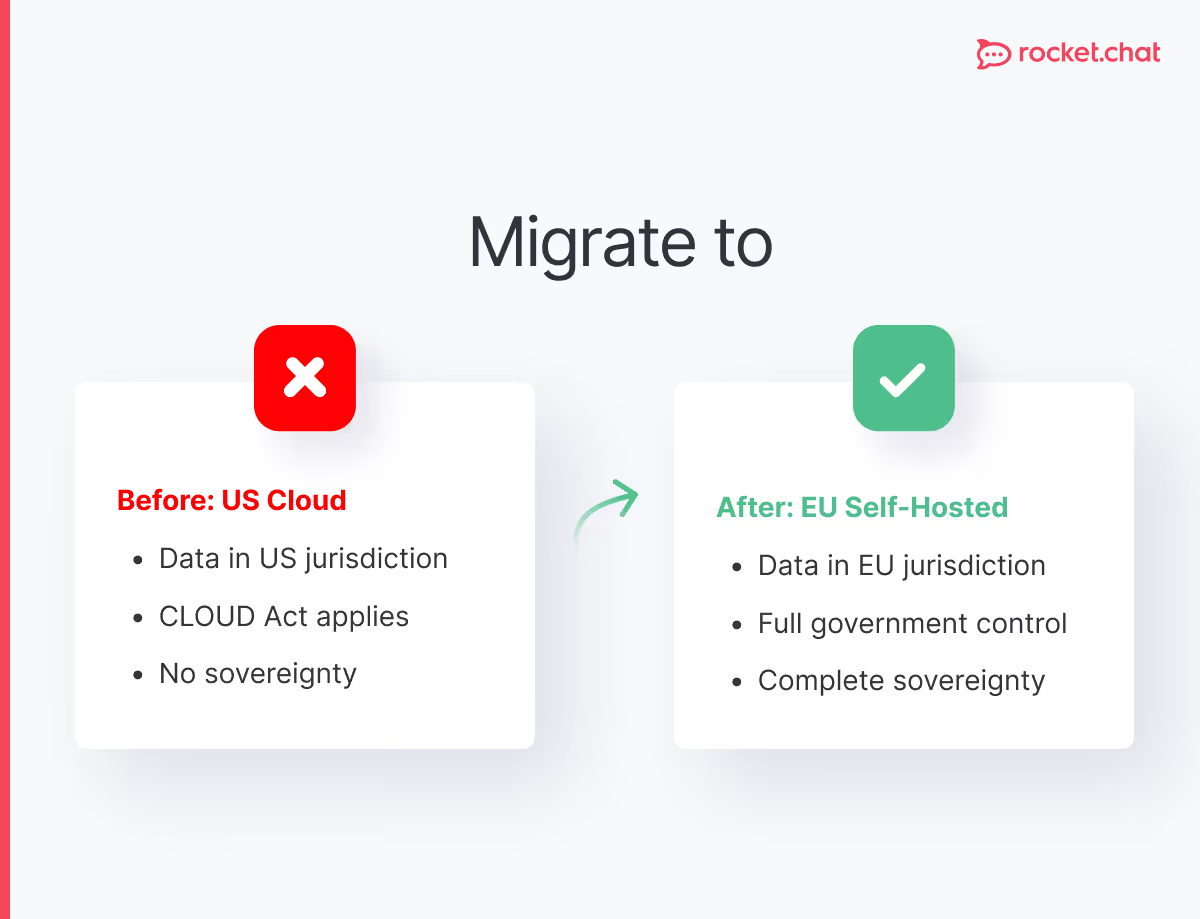
Microsoft Teams and Slack, despite EU data centers, remain under US jurisdiction subject to the CLOUD Act. Microsoft holds encryption keys and can access messages if compelled by legal process. Their closed-source architecture prevents independent security verification. Teams' cloud dependency makes air-gapped deployment impossible, and bundled licensing creates hidden costs when migrating away.
Planning a Teams alternative implementation
Many government agencies adopt a complementary approach rather than full replacement—using Microsoft 365 for productivity tools while deploying sovereign platforms for sensitive communications. This section covers both integration and migration scenarios.
Data migration strategy
Step 1: Audit existing data. Before migration, understand what you're migrating: message history, files, channels, user accounts, permissions, and integrations. Teams exports data in proprietary formats that require conversion.
Step 2: Prioritize data. Not all data needs migration. Focus on active channels, recent history, and critical files. Archiving old Teams data for compliance while migrating only active content reduces migration complexity.
Step 3: Map data structures. Teams channels don't always map directly to alternative platform structures. Plan how Teams, channels, and private messages will be organized in the new platform.
Step 4: Execute migration. Use migration tools where available or develop custom scripts for data conversion. For instant messaging platforms, phased migration often works better than "big bang" cutover.
Integration replacement
Teams integrates deeply with Microsoft 365. Agencies must identify and replace these integrations:
- Calendar integration: Replace with open standards like CalDAV
- File storage: Migrate from OneDrive/SharePoint to alternative storage
- Authentication: Configure SSO with SAML or OAuth
- Bots and automation: Rebuild using new platform APIs
Rocket.Chat's extensive API and webhook support enables most Teams integrations to be replicated, though implementation effort varies by complexity.
User adoption and training
Technical migration is the easy part. User adoption determines success. Digital transformation failures often result from user resistance, not technical issues.
Effective adoption strategies:
- Early involvement: Include users in platform selection and testing
- Clear communication: Explain why the change is necessary and how it benefits them
- Comprehensive training: Provide hands-on training, documentation, and ongoing support
- Champion program: Identify enthusiastic early adopters to help peers
- Gradual rollout: Pilot with friendly user groups before full deployment
For government chat platforms, emphasizing security and sovereignty benefits often resonates with users who understand why protecting government communications matters.
Key questions to ask vendors
Don't accept marketing answers. Probe for specifics:
About sovereignty:
- "What is your company's country of incorporation?"
- "Can you guarantee data will never transit US infrastructure?"
- "What happens if the US government issues a data request?"
- "Do you have any contractual obligations that would require you to share data?"
About security:
- "Can we audit your source code?"
- "Who holds encryption keys in your E2EE implementation?"
- "Have you undergone independent security audits? Can we see the reports?"
- "What data can your employees access?"
About compliance:
- "How do you help us comply with [specific regulation]?"
- "Can you provide detailed data flow diagrams?"
- "What compliance certifications do you hold?"
- "How do you handle data subject access requests?"
About lock-in:
- "Can we export all our data in standard formats?"
- "What happens to our data if we cancel our subscription?"
- "Are there any features that would prevent us from migrating to a competitor?"
Evasive or vague answers should raise red flags. Platforms that respect customer sovereignty provide clear, direct answers to these questions.
Frequently asked questions about <anything>
MS Teams alternatives for European government
Why are European government agencies moving away from Microsoft Teams?
What features must a Teams replacement provide for government use?
How long does migration from Teams to a sovereign platform take?
What are the biggest challenges when replacing Teams?
Can we maintain Microsoft 365 while replacing Teams?
What deployment options exist for Teams alternatives?
What training do users need when switching from Teams?
Which European government agencies have already replaced Teams?


- Digital sovereignty
- Federation capabilities
- Scalable and white-labeled

- Highly scalable and secure
- Full patient conversation history
- HIPAA-ready

for mission-critical operations
- On-premise and air-gapped ready
- Full control over sensitive data
- Secure cross-agency collaboration
%201.svg)
- Open source code
- Highly secure and scalable
- Unmatched flexibility

- End-to-end encryption
- Cloud or on-prem deployment
- Supports compliance with HIPAA, GDPR, FINRA, and more

- Supports compliance with HIPAA, GDPR, FINRA, and more
- Highly secure and flexible
- On-prem or cloud deployment